Project Financials, Time, Files and History
Project tabs have five new views:
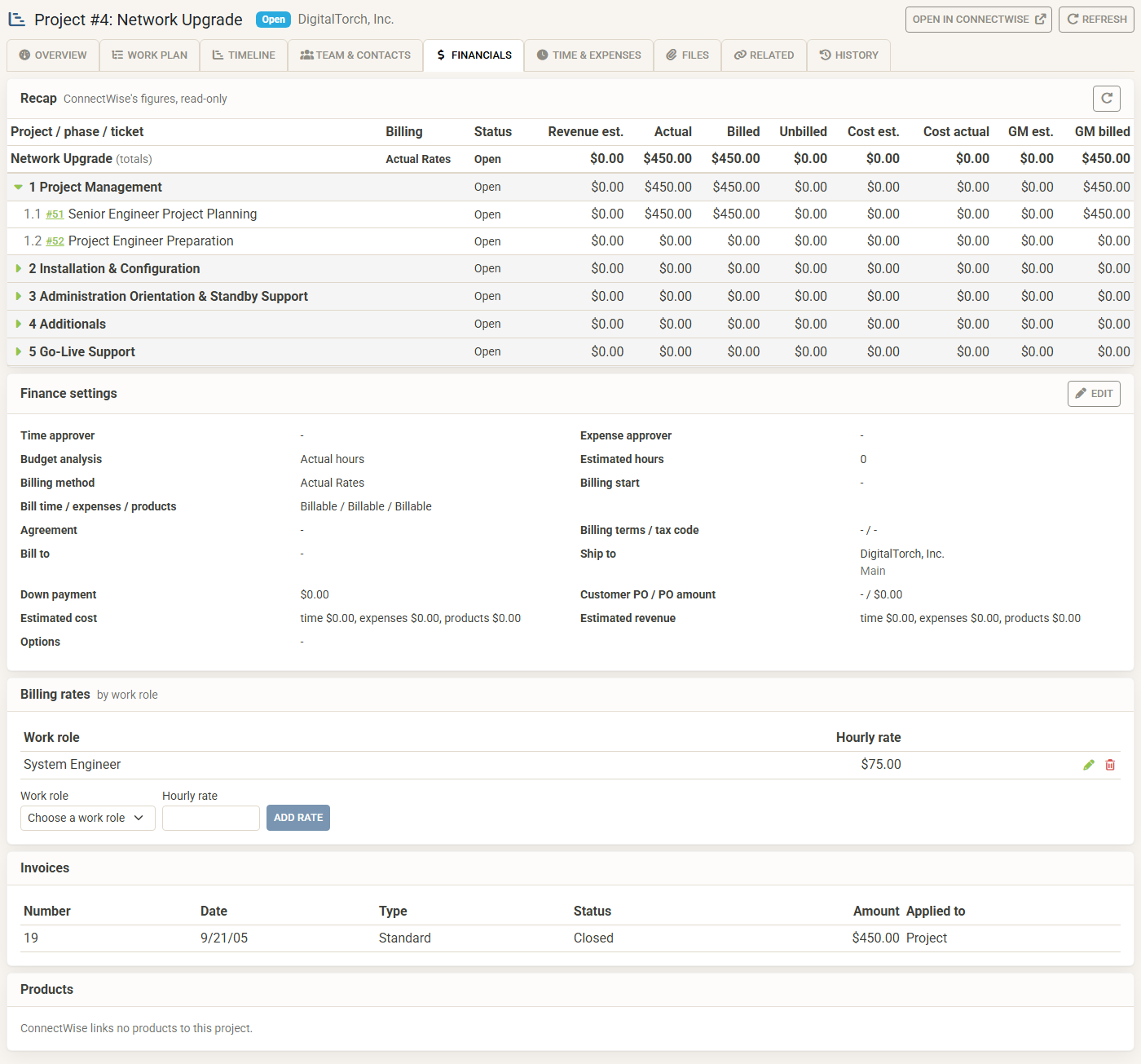
- Financials shows ConnectWise’s project recap: estimated, actual, billed and unbilled revenue, cost and gross margin for the project, each phase and each ticket. Below it are the project’s finance settings, billing rates by work role or staff member, and its invoices and products. If your role can change project finance, you can edit the settings and add, change or remove billing rates. MTX saves only the settings you changed.
- Time & Expenses lists the time entries and expenses booked to the project, with billable and non-billable totals. Group them by phase, ticket or member. Click a ticket number to open the ticket.
- Files lists the project’s own documents. You can open or download one, upload a file, add a link, or delete a document.
- Related shows the activities and configurations linked to the project’s tickets. A configuration on several tickets is listed once, with all its ticket numbers.
- History shows the project’s ConnectWise audit trail, newest first. Filter it by text and load older entries as you need them.
In the Projects tab, the Money columns menu adds billed revenue, unbilled revenue, actual cost and billed gross margin to the list. MTX remembers your choice on this device.
What you see follows your ConnectWise security role. A section your role can’t see says so, and the other sections still load. Time and expense totals cover the entries ConnectWise shows you. The Work Plan now offers Add Phase only when your role can add phases.